What Is the Best Plant Selection App for Choosing Garden Plants?
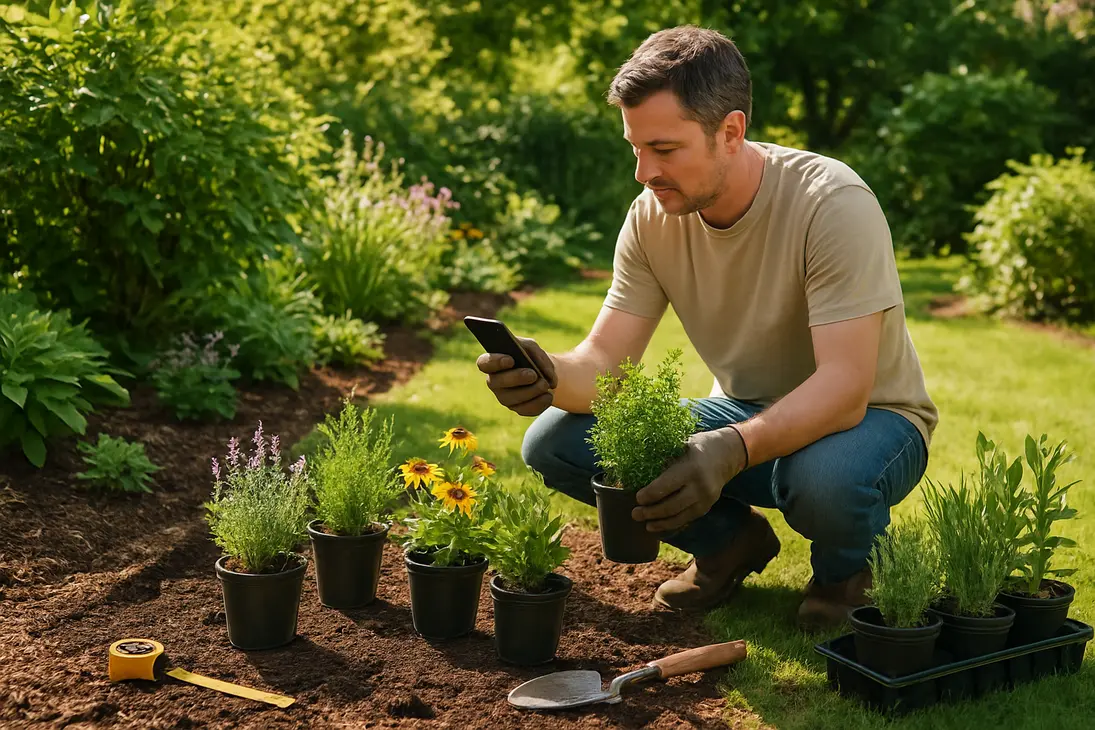
The best plant selection app is not simply the one with the biggest plant database or most accurate camera ID. For choosing garden plants, the most useful app answers one question: will this plant grow well in my specific garden, with my climate, light, soil, space, and available time?
A good plant selection app should help you:
- Filter plants by location, region, or hardiness zone
- Match plants to sun, shade, soil moisture, mature size, and bloom time
- Understand care needs before buying
- Plan beds, borders, containers, or edible gardens
Plant identification apps are useful, but selection apps matter more when you are designing a garden, choosing shrubs, filling containers, or planning a pollinator bed.
What a plant selection app can help you choose
A plant selection app narrows a huge range of plants into realistic options for your site. Instead of starting with “What looks pretty?” it pushes you toward “What will thrive here?”
That matters because many failures come from mismatch: a sun plant in shade, a moisture-loving plant in dry soil, a shrub planted too close to a window, or a perennial that is not hardy in your climate.
Matching plants to your region or hardiness zone
Regional suitability is one of the most important features. At minimum, the app should let you enter your location or hardiness zone and filter out plants unlikely to survive your winter or tolerate your climate.
Hardiness zones are most useful for perennials, shrubs, trees, vines, and bulbs because they indicate winter cold tolerance. But zone is only a starting point. Coastal exposure, humidity, dry heat, elevation, wind, rainfall, and urban heat can all affect plant performance.
For annual vegetables and flowers, the app should also consider frost dates or growing season length. Warm-season plants such as tomatoes, peppers, basil, and zinnias need the right planting window even if they grow well in summer.
Choosing plants by sun, shade, and microclimate
Sunlight is one of the biggest reasons garden plans succeed or fail. A plant selection app should let you choose full sun, part sun, part shade, full shade, or similar categories.
| Light condition | What it usually means |
|---|---|
| Full sun | 6+ hours of direct sun |
| Part sun | 4–6 hours of direct sun |
| Part shade | 2–4 hours of sun, often morning sun |
| Full shade | Little or no direct sun |
Microclimate matters too. A south-facing wall may be hotter and drier than the rest of the garden. A low spot may stay wet after rain. A bed under mature trees may be dry shade, not just shade. The best apps let you account for these details through water needs, drought tolerance, soil moisture, and exposure.
Filtering by plant type, size, bloom time, or purpose
Once location and light are set, the app should help refine choices by function. Gardeners rarely need “any plant that grows here.” They need plants for a purpose.
Useful filters include:
- Plant type: annual, perennial, shrub, tree, vine, bulb, grass, vegetable, herb
- Mature height and spread: important near paths, windows, fences, and doors
- Bloom time: spring, summer, fall, or repeat blooming
- Water and soil needs: dry, average, moist, well-drained, clay-tolerant, sandy-soil tolerant
- Wildlife value: pollinator-friendly, bird-friendly, deer-resistant where applicable
- Use: containers, hedges, groundcovers, cut flowers, edible gardens, rain gardens, privacy screens
This is where an app becomes more useful than a search engine: it helps compare realistic options instead of forcing a pretty plant into the wrong place.
Features to look for in a plant selection app
The best plant selection app should feel practical, not overwhelming. It should match how you actually garden, not create a system you stop using after a week.
Location-based plant recommendations
Location-based recommendations should be a priority. The app should ask for your location, hardiness zone, region, or climate before suggesting plants.
Be cautious with apps that recommend the same plants everywhere. A plant that is easy in one region may be invasive, pest-prone, short-lived, or winter-tender in another. Large global databases can be helpful, but they may lack local nuance.
The most useful apps include regional plant lists, native plant options, or links to reputable local guidance. Extension services, botanic garden plant finders, and native plant society resources can be excellent companions to an app.
Sunlight, watering, and care tracking
A strong app connects selection with care. It should not only say “full sun,” but also help you remember where that plant is located and what it needs over time.
Helpful care features include:
- Watering reminders
- Fertilizing or pruning notes
- Planting dates
- Photos over time
- Notes about bloom, pests, weather stress, or harvests
Use reminders with judgment. A fixed watering schedule may be wrong after heavy rain, during a heat wave, or for a container that dries faster than a garden bed. Adjustable reminders are better than rigid ones.
Plant identification and problem diagnosis
Plant identification is useful, but it should not be the only feature you rely on. A camera ID tool can help identify a plant at a nursery, in a friend’s garden, or in your yard. It may also suggest causes of yellowing leaves, spots, wilting, or pest damage.
Still, ID and diagnosis tools have limits. Lighting, damaged leaves, immature growth, and similar-looking plants can cause mistakes. Treat app diagnoses as clues, not final answers.
For selection, identification works best as a supporting feature: “What is this plant, and would it suit my garden?” rather than only “What is this plant?”
Beginner-friendly planning tools and reminders
For beginners, a plant selection app should reduce guesswork. Look for tools that let you build a bed, save a wishlist, compare plants, and check mature sizes before planting.
Useful planning tools include:
- A simple garden map or bed layout
- Plant spacing guidance
- Calendar reminders
- Saved lists for different beds
- Notes and photos
- Warnings about toxic, invasive, or high-maintenance plants where available
Plain language matters. “Moist, well-drained soil” is more useful when the app explains that soil should hold some moisture without staying soggy. “Low maintenance” should reflect real tasks such as pruning, staking, deadheading, watering, and pest management.
How to use a plant selection app before buying plants
A plant selection app works best before you visit the nursery. If you use it only while standing in front of blooming plants, impulse choices are harder to resist.
Check your garden conditions first
Before using the app, observe the site. Better input leads to better recommendations.
Check:
- Sunlight: Count direct sun hours. Morning sun is gentler than afternoon sun.
- Soil moisture: See whether the area drains quickly, stays evenly moist, or remains soggy.
- Soil texture: Sandy soil drains fast; clay holds water longer and may compact.
- Space: Measure the bed and note paths, walls, windows, utilities, and roof overhangs.
- Exposure: Look for wind, reflected heat, tree shade, or sheltered pockets.
- Access: Make sure you can water, prune, harvest, weed, or divide plants later.
Do not guess at bed size. Many long-term problems begin with underestimating space.
Use filters to build a realistic shortlist
Enter your conditions and filter firmly. Leaving everything broad may produce too many unsuitable choices.
A useful order is:
- Set location, region, or zone.
- Choose actual light level.
- Select soil moisture or drainage.
- Choose plant type and purpose.
- Filter by mature height and spread.
- Check bloom time, color, wildlife value, or edible use.
- Remove plants that need more care than you want to provide.
Aim for a shortlist, not a final answer. For a small border, that might mean several possible perennials and shrubs. For containers, it might mean combinations of upright, trailing, and filler plants with similar water and sun needs.
Cross-check recommendations with local nurseries or extension advice
Before buying, verify your shortlist locally. Ask whether each plant performs well in your region, is reliably hardy, struggles with local pests or humidity, becomes aggressive, or has better cultivars for your conditions.
Local extension resources, master gardener programs, native plant groups, and public garden lists can also help. Apps are broad tools; local advice catches regional details.
This step matters because garden centers sometimes sell plants that are attractive but marginally hardy, water-hungry, or poorly suited to local soil. You may still grow them, but you should understand the trade-off.
Common mistakes a plant selection app can help you avoid
New gardeners often choose the wrong plant for the site, ignore hardiness, plant too closely, or underestimate maintenance. A good app can prevent many of these mistakes if you use its filters honestly.
Selecting plants that do not suit the site
The classic mistake is choosing by appearance first and conditions second. A plant in full bloom at the nursery may not match your light, soil, or moisture.
Common mismatches include:
- Lavender in heavy, wet soil
- Hostas in hot afternoon sun
- Sun-loving flowers in deep shade
- Moisture-loving plants in dry beds under trees
- Vegetables in sites with too little direct sun
- Acid-loving shrubs in unsuitable soil without a correction plan
An app can filter out poor matches before they tempt you, but only if your site information is accurate.
Ignoring mature size and spacing
Nursery plants are young. A shrub in a small pot may become six feet wide. A tree that looks manageable may later shade vegetables, crowd the house, or lift paving.
A good plant selection app should list mature height and spread, not just current size. Pay attention to:
- Plant-to-plant spacing: Avoid crowding and poor airflow.
- Plant-to-structure spacing: Keep shrubs and trees away from siding, fences, paths, and foundations.
- Maintenance access: Leave room to prune, weed, harvest, and walk.
Dense planting looks full quickly, but compact cultivars are often better for small spaces than full-size plants squeezed too close together.
Choosing plants that need more care than you can give
A garden should fit your life. If you travel often, forget to water, dislike pruning, or have limited physical energy, choose plants that match that reality.
Be honest about tasks such as watering, deadheading, staking, dividing perennials, pruning shrubs, frost protection, pest management, and cleanup.
High-maintenance plants are not bad. Roses, dahlias, espalier fruit, vegetable gardens, and containers can be rewarding. But they are frustrating if you expected a plant-and-forget garden.
Apps with care filters and reminders can help busy gardeners choose lower-maintenance options such as site-suited native plants, drought-tolerant perennials, slow-growing shrubs, and mulched beds.
Are plant selection apps enough on their own?
Plant selection apps are useful, but they are not enough on their own. Gardens are living systems with local quirks.
Before planting, verify:
- Local suitability: Does the plant perform well in your region, not just your zone?
- Invasive status: Is it invasive or restricted where you live?
- Pest and disease pressure: Is it known to struggle locally?
- Soil constraints: Is your soil unusually alkaline, acidic, compacted, salty, wet, or dry?
- Water availability: Can you support the plant through establishment and drought?
- Wildlife pressure: Are deer, rabbits, voles, or other animals likely to damage it?
- Household safety: Is it a concern for pets, children, or livestock?
Apps may also miss unusual sites such as rooftops, windy balconies, reflected pavement heat, coastal salt spray, deep root competition under trees, or beds near downspouts.
Think of the app as your first filter. It organizes options and removes obvious mismatches. Local knowledge helps you make the final decision.
Conclusion
The best plant selection app helps you choose plants for your actual garden, not an ideal version of it. Look for regional recommendations, climate filters, sunlight and water requirements, mature size information, care tracking, and simple planning tools.
Plant identification is useful, but it should not replace site-based selection. Use the app to build a realistic shortlist, then confirm it with local nurseries, extension advice, or regional plant resources. Digital filtering plus local judgment is usually the most reliable way to choose garden plants that thrive.
FAQ
What is a plant selection app?
A plant selection app is a gardening app that helps you choose plants based on conditions such as location, hardiness zone, sunlight, soil moisture, plant type, mature size, bloom time, and care preferences.
Some also include planning tools, reminders, plant identification, and problem diagnosis. The key difference is that selection apps help you decide what to plant before you buy.
Can a plant selection app tell me what grows best in my area?
A good plant selection app can suggest plants likely to grow well in your area, especially if it uses location, hardiness zone, and climate information. However, it may miss local issues.
For best results, treat recommendations as a shortlist and verify them with local nurseries, extension resources, public gardens, or experienced gardeners. Soil, pests, rainfall, heat, humidity, and invasive plant rules can all affect suitability.
Are plant identification apps the same as plant selection apps?
Not always. A plant identification app tells you what a plant is, usually from a photo. A plant selection app helps you decide which plants to grow in a specific place.
Some apps do both, but many identification apps are better at naming plants than judging whether they belong in your garden. For planning, look for filters for region, light, soil, mature size, water needs, bloom time, and maintenance level.
What information should I know before using a plant selection app?
Before using a plant selection app, know:
- Your location or hardiness zone
- How many hours of direct sun the site receives
- Whether the soil is dry, average, moist, or poorly drained
- The size of the planting area
- Whether the site is windy, tree-shaded, or exposed to reflected heat
- How much watering, pruning, and maintenance you realistically want to do
Accurate site information leads to better recommendations.
Sources
- Reddit gardening discussion on whether plant care apps help in real life: https://www.reddit.com/r/gardening/comments/1q97mw6/is_there_any_app_for_plant_care_that_actually
- Reddit gardening discussion illustrating real plant care troubleshooting concerns: https://www.reddit.com/r/gardening/comments/8adlm7/chilli_plant_issues
You Might Also Like