Smart Pot vs Phone App: Which Is Better for Plant Care?
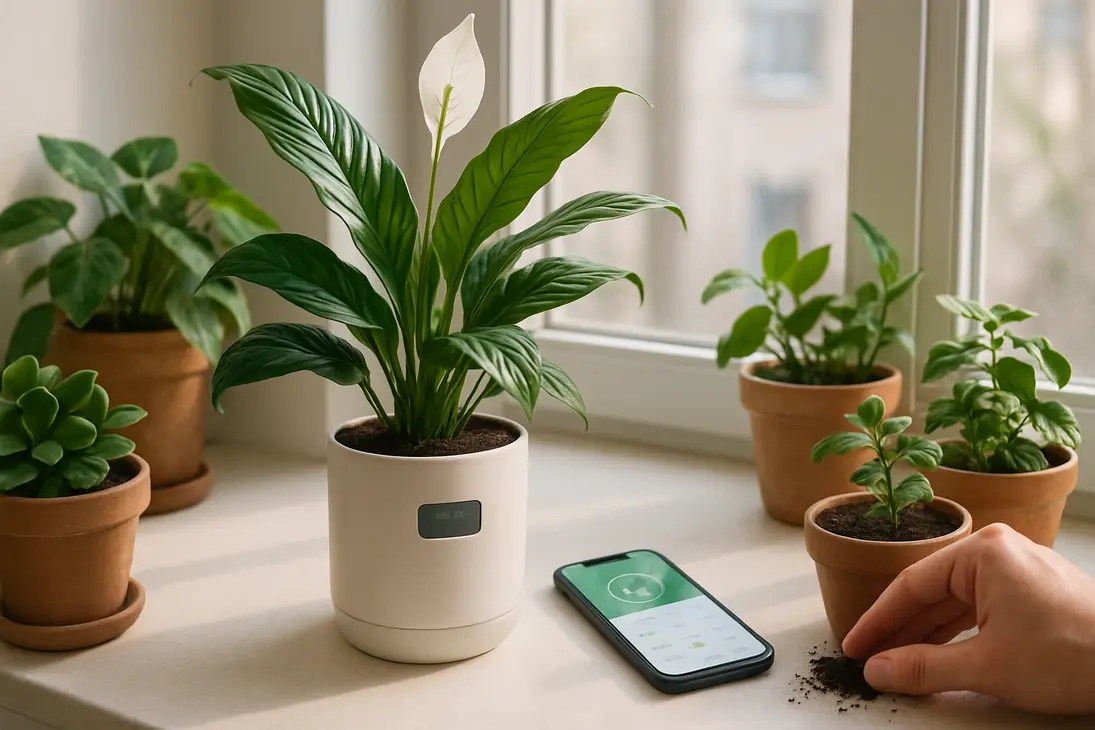
Choosing between a smart pot vs phone app depends on the kind of help you need. A smart pot measures conditions around one plant, often soil moisture or water level. A phone app helps you plan, remember, identify, and track care for many plants.
For most people, a phone app is the better first choice. It is cheaper, works for an entire collection, and builds better habits. A smart pot is more useful when one valuable, fussy, or often-forgotten plant needs closer monitoring.
Neither replaces observation. Good plant care still means checking soil, watching leaves, adjusting to seasons, and learning how each plant behaves in your home.
Smart Pot vs Phone App: The Core Difference
A smart pot is hardware: a pot, insert, or self-watering container with sensors, alerts, a display, or app connection. It can measure something near the plant, such as moisture, light, temperature, or reservoir level.
A plant care app is software. It usually offers reminders, care guides, plant identification, photo logs, notes, and problem-solving tips. Unless it connects to a sensor, it does not know what is happening in the soil.
That difference matters. An app may remind you that a pothos often needs water every 7–10 days. A smart pot can show that this specific pothos is still wet today.
What a Smart Pot Usually Does
Smart pots vary, but common features include:
- Soil moisture monitoring
- Water-level alerts in self-watering models
- Light or temperature readings
- Visual alerts through a display, icon, or app
- Sensor-based watering reminders
- Sometimes automatic or semi-automatic watering
A smart pot is most useful for one plant where watering mistakes are common: a peace lily, calathea, fern, herb pot, office plant, or plant owned by someone who travels.
It is not a plant doctor. It may detect moisture or light, but it cannot fully diagnose pests, root rot, compacted soil, fertilizer burn, or dormancy without your judgment.
What a Plant Care App Usually Does
Plant care apps are broader but less direct. Depending on the app, they may include:
- Watering and fertilizing reminders
- Plant identification from photos
- Care guides
- Photo journals and notes
- Repotting, pruning, and pest treatment logs
- Outdoor gardening calendars
- Image-based problem diagnosis
- Collection management
Apps are especially useful once you own more than a few plants. They help you remember what was watered, moved, repotted, fertilized, or treated. Their weakness is general advice. “Water weekly” may be wrong in low light, dense soil, a glazed pot, winter conditions, or a cool room.
Where Their Features Overlap
Smart pots and apps overlap in reminders, alerts, and care advice. Some smart pots connect to apps, and some apps work with external soil sensors.
| Feature | Smart Pot | Phone App |
|---|---|---|
| Watering reminders | Often sensor-based | Usually schedule-based |
| Soil moisture reading | Yes, if sensor included | Only with sensor |
| Light guidance | Sometimes measured | Usually advice-based |
| Plant ID | Rare | Common |
| Many-plant management | Limited | Strong |
| Learning care | Basic to moderate | Strong |
| Best for | One monitored plant | Whole collection |
In simple terms: a smart pot watches a plant. An app helps manage your care routine.
Which Tool Is More Effective for Everyday Plant Care?
Neither tool wins every category. A smart pot is better for direct monitoring of one plant’s conditions. A phone app is better for organizing care across several plants and learning what each one needs.
Choose based on your main problem. If plants die because you forget them, either tool can help. If they die because you water on a fixed schedule, a smart pot or moisture sensor may help more. If they die because you do not understand light, pests, or seasonal changes, an app may be more useful.
Watering Accuracy and Soil Moisture Tracking
Watering is where smart pots have the clearest advantage. A moisture sensor can show whether the mix is wet, drying, or dry near the sensor. That is more useful than a calendar because plants do not use water at the same rate every week.
Water use changes with season, light, room temperature, pot size, soil mix, humidity, airflow, and root health. A phone app can remind you to check, but without a sensor it cannot know whether the soil is dry.
Smart pots also have limits. A probe reads only the area around it. In a large pot, the top may be dry while the bottom is wet. In chunky orchid bark or airy aroid mix, contact may be inconsistent. Mineral buildup, battery issues, or poor placement can also affect readings.
Best practice: treat reminders as prompts, not commands. Water because the plant needs it, not because a notification appeared.
Light and Location Guidance
Light is hard to judge because human eyes adjust quickly. A corner that looks bright may still be too dim for a sun-loving plant.
A smart pot with a light sensor can show whether the current location receives enough brightness during the day. This is useful when a plant stretches, drops leaves, grows slowly, or refuses to bloom.
A phone app usually teaches what the plant prefers: low light, bright indirect light, full sun, shade, or similar categories. Some apps use the phone camera or light sensor, but results vary by phone, angle, weather, and time of day.
For houseplants, an app is often better for learning target conditions. A smart pot is better for checking whether the current spot is close to those conditions.
Reminders, Logs, and Care Schedules
Phone apps are usually better for reminders and logs, especially if you own many plants. You can track watering, fertilizing, pruning, rotating, repotting, pest checks, and seed starting. Photos and notes also help when a problem develops slowly.
A good log can show when you last watered, whether yellowing started after fertilizing, whether a plant improved after moving, when it was repotted, or which plant had pests recently.
A smart pot may manage one plant well, but scaling smart hardware to every pot is expensive. For most collections, one app is more practical.
Diagnosing Plant Problems
Both tools require caution for diagnosis.
A phone app may suggest pests, underwatering, overwatering, disease, nutrient issues, or light stress from a photo. That can help beginners, but image diagnosis is not always reliable. Yellow leaves, for example, can come from overwatering, underwatering, low light, aging, cold damage, nutrient shortage, or root stress.
A smart pot can offer clues. Wet soil plus yellowing may suggest overwatering or poor drainage. Low light readings plus leggy growth may point to insufficient light. But a pot will not see scale insects under leaves or roots circling inside the container.
Use technology to narrow the possibilities, then inspect the plant. Check drainage, soil, leaf undersides, stems, recent changes, and the plant’s known needs.
Pros and Cons of Smart Pots
Smart pots reduce guesswork for specific plants, but they cost more and are less flexible than apps. They work best when you understand what the sensor can and cannot tell you.
Smart Pot Pros
The biggest advantage is real-time or near-real-time feedback. Instead of guessing whether the soil is dry, you can check a display or connected app. This is useful for beginners and for anyone who tends to overwater.
Smart pots can also teach plant rhythms. You may notice soil dries faster in summer, slower in winter, faster near a bright window, or slower in a large glazed pot.
Key benefits include:
- Convenience
- Better care for one important plant
- Helpful cues for forgetful owners
- Support for self-watering reservoirs
- Useful feedback for moisture-sensitive plants
- Less watering by routine
They can be especially helpful for office plants, herbs, ferns, peace lilies, calatheas, or plants cared for by multiple people.
Smart Pot Cons
The main downside is cost. Buying smart hardware for one plant may be reasonable; buying it for twenty plants may not be.
Pot fit is another issue. A plant still needs the right size, drainage, stability, and potting mix. Technology cannot make a poor container suitable. Some plants also need special setups, such as orchids in bark and ventilated pots, succulents in fast-draining terracotta, or large plants in heavy containers.
Other drawbacks include:
- Hardware can fail
- Sensors may be affected by soil type or placement
- Batteries and connectivity can be inconvenient
- Some models are less flexible than separate sensors
- Owners may stop observing leaves, roots, and pests
- A simple moisture meter or finger test may be enough
A smart pot is a monitor, not an autopilot system.
Pros and Cons of Phone Apps
Phone apps are popular because they are easy to try, low-cost, and useful across many plants. Their weakness is that they usually rely on general profiles and user-entered schedules rather than live conditions.
Phone App Pros
The strongest benefit is flexibility. You can add one plant or a whole collection, adjust reminders, save photos, and record what worked. This makes apps useful for houseplants, balconies, vegetable beds, and mixed indoor gardens.
Apps are also good learning tools. They can explain basic light needs, watering preferences, fertilizing schedules, propagation methods, and common problems. Even when the advice needs adjustment, it gives beginners a starting point.
Main advantages include:
- Affordability
- Collection management
- Plant identification
- Photo history
- Custom reminders
- Care notes
- Outdoor planning help
- Portability at nurseries or in the garden
Even experienced gardeners benefit from logs. It is easy to forget when you fertilized, treated pests, repotted, or sowed seeds.
Phone App Cons
The biggest problem is generic advice. An app may not account for your exact light, room temperature, soil, pot material, humidity, season, or watering habits.
Two identical rubber plants may need different watering schedules if one is in terracotta near a bright window and the other is in glazed ceramic across the room. Unless you adjust the app, it may treat them the same.
Common disadvantages include:
- Reminders can become wrong over time
- Plants often need less water in winter
- Photo identification can be inaccurate
- Image diagnosis can oversimplify symptoms
- Some databases are vague or outdated
- Notifications may encourage overcare
- Premium subscriptions can add up
A plant app works best as a notebook, teacher, and reminder system—not as the final authority.
Which Should You Choose?
The best choice depends on your plant-care style, budget, and number of plants.
If you are comparing a smart pot vs phone app for one indoor plant you keep forgetting, a smart pot may solve the immediate problem. If you are managing several plants and want reminders, identification, notes, and care guidance, a phone app is usually the better first choice.
Choose a Smart Pot If…
Choose a smart pot if:
- You struggle with watering one specific plant.
- You want visible feedback without opening your phone.
- You care for a moisture-sensitive plant.
- You travel or forget to check soil.
- The plant fits the pot’s size and drainage.
- You are willing to pay for convenience.
- You will still inspect the plant manually.
A smart pot can be worthwhile for beginners if it teaches better habits. It is less helpful if it makes you ignore the plant except when the screen changes.
Choose a Phone App If…
Choose a phone app if:
- You have several plants.
- You want care instructions and plant identification.
- You need reminders for watering, fertilizing, pruning, or repotting.
- You like keeping photos and notes.
- You are learning plant names and basic care.
- You garden outdoors as well as indoors.
- You want a low-cost option before buying hardware.
A phone app is also better if you enjoy active learning and want to understand patterns over time.
Use Both If…
Using both can be ideal when you have one or two high-priority plants plus a larger collection. The smart pot monitors the plant most likely to suffer from watering mistakes, while the app manages everything else.
Use both if:
- You have a valuable or fussy plant.
- You want logs plus sensor alerts.
- You are learning how soil moisture changes by season.
- You manage many plants but only need hardware for a few.
- You want reminders to check plants, not automatic orders to water.
A practical setup might be a smart pot for a fern or basil plant, plus an app for pothos, snake plants, succulents, orchids, and outdoor containers.
Conclusion
In the smart pot vs phone app comparison, the better tool depends on the job.
A smart pot is better for direct, sensor-based monitoring of one plant, especially soil moisture. It can reduce guesswork, but it is limited by cost, pot size, sensor accuracy, and hardware reliability.
A phone app is better for broader care: reminders, logs, identification, learning, planning, and managing multiple plants. It is affordable and flexible, but its advice must be adjusted to real conditions.
For most plant owners, start with a good app and basic observation habits. Add a smart pot when one specific plant would genuinely benefit from closer monitoring.
FAQ
Can a plant care app replace a smart pot?
A plant care app can replace a smart pot for reminders, logging, identification, and general advice. It cannot replace sensor readings unless it connects to a moisture sensor or smart device.
If your main need is remembering tasks, an app is enough. If you need to know whether one pot is actually dry, a smart pot or sensor is more useful.
Are smart pots worth it for beginners?
Smart pots can be worth it for beginners who struggle with watering one or two important plants. They can show how quickly soil dries in your home.
They are less worthwhile if you expect them to solve every problem. Beginners still need to learn light, drainage, pests, seasonal changes, and signs of healthy growth.
Do smart pots work with phone apps?
Some smart pots work with phone apps, but not all. Some use a built-in display only, while others connect by Bluetooth or Wi-Fi.
Before buying, check compatibility, whether an account is required, and whether important features depend on a subscription.
What is the biggest limitation of using only a phone app for plant care?
The biggest limitation is that an app usually does not know the real condition of your soil, roots, light, or room environment. It may remind you to water even when the pot is still moist.
Use app reminders as prompts to check the plant. Feel the soil, lift the pot, inspect the leaves, and adjust care as conditions change.
You Might Also Like